
/** * WooCommerce Stock Functions * * Functions used to manage product stock levels. * * @package WooCommerce\Functions * @version 3.4.0 */ defined( 'ABSPATH' ) || exit; /** * Update a product's stock amount. * * Uses queries rather than update_post_meta so we can do this in one query (to avoid stock issues). * * @since 3.0.0 this supports set, increase and decrease. * * @param int|WC_Product $product Product ID or product instance. * @param int|null $stock_quantity Stock quantity. * @param string $operation Type of operation, allows 'set', 'increase' and 'decrease'. * @param bool $updating If true, the product object won't be saved here as it will be updated later. * @return bool|int|null */ function wc_update_product_stock( $product, $stock_quantity = null, $operation = 'set', $updating = false ) { if ( ! is_a( $product, 'WC_Product' ) ) { $product = wc_get_product( $product ); } if ( ! $product ) { return false; } if ( ! is_null( $stock_quantity ) && $product->managing_stock() ) { // Some products (variations) can have their stock managed by their parent. Get the correct object to be updated here. $product_id_with_stock = $product->get_stock_managed_by_id(); $product_with_stock = $product_id_with_stock !== $product->get_id() ? wc_get_product( $product_id_with_stock ) : $product; $data_store = WC_Data_Store::load( 'product' ); // Fire actions to let 3rd parties know the stock is about to be changed. if ( $product_with_stock->is_type( 'variation' ) ) { do_action( 'woocommerce_variation_before_set_stock', $product_with_stock ); } else { do_action( 'woocommerce_product_before_set_stock', $product_with_stock ); } // Update the database. $new_stock = $data_store->update_product_stock( $product_id_with_stock, $stock_quantity, $operation ); // Update the product object. $data_store->read_stock_quantity( $product_with_stock, $new_stock ); // If this is not being called during an update routine, save the product so stock status etc is in sync, and caches are cleared. if ( ! $updating ) { $product_with_stock->save(); } // Fire actions to let 3rd parties know the stock changed. if ( $product_with_stock->is_type( 'variation' ) ) { do_action( 'woocommerce_variation_set_stock', $product_with_stock ); } else { do_action( 'woocommerce_product_set_stock', $product_with_stock ); } return $product_with_stock->get_stock_quantity(); } return $product->get_stock_quantity(); } /** * Update a product's stock status. * * @param int $product_id Product ID. * @param string $status Status. */ function wc_update_product_stock_status( $product_id, $status ) { $product = wc_get_product( $product_id ); if ( $product ) { $product->set_stock_status( $status ); $product->save(); } } /** * When a payment is complete, we can reduce stock levels for items within an order. * * @since 3.0.0 * @param int $order_id Order ID. */ function wc_maybe_reduce_stock_levels( $order_id ) { $order = wc_get_order( $order_id ); if ( ! $order ) { return; } $stock_reduced = $order->get_data_store()->get_stock_reduced( $order_id ); $trigger_reduce = apply_filters( 'woocommerce_payment_complete_reduce_order_stock', ! $stock_reduced, $order_id ); // Only continue if we're reducing stock. if ( ! $trigger_reduce ) { return; } wc_reduce_stock_levels( $order ); // Ensure stock is marked as "reduced" in case payment complete or other stock actions are called. $order->get_data_store()->set_stock_reduced( $order_id, true ); } add_action( 'woocommerce_payment_complete', 'wc_maybe_reduce_stock_levels' ); add_action( 'woocommerce_order_status_completed', 'wc_maybe_reduce_stock_levels' ); add_action( 'woocommerce_order_status_processing', 'wc_maybe_reduce_stock_levels' ); add_action( 'woocommerce_order_status_on-hold', 'wc_maybe_reduce_stock_levels' ); /** * When a payment is cancelled, restore stock. * * @since 3.0.0 * @param int $order_id Order ID. */ function wc_maybe_increase_stock_levels( $order_id ) { $order = wc_get_order( $order_id ); if ( ! $order ) { return; } $stock_reduced = $order->get_data_store()->get_stock_reduced( $order_id ); $trigger_increase = (bool) $stock_reduced; // Only continue if we're increasing stock. if ( ! $trigger_increase ) { return; } wc_increase_stock_levels( $order ); // Ensure stock is not marked as "reduced" anymore. $order->get_data_store()->set_stock_reduced( $order_id, false ); } add_action( 'woocommerce_order_status_cancelled', 'wc_maybe_increase_stock_levels' ); add_action( 'woocommerce_order_status_pending', 'wc_maybe_increase_stock_levels' ); /** * Reduce stock levels for items within an order, if stock has not already been reduced for the items. * * @since 3.0.0 * @param int|WC_Order $order_id Order ID or order instance. */ function wc_reduce_stock_levels( $order_id ) { if ( is_a( $order_id, 'WC_Order' ) ) { $order = $order_id; $order_id = $order->get_id(); } else { $order = wc_get_order( $order_id ); } // We need an order, and a store with stock management to continue. if ( ! $order || 'yes' !== get_option( 'woocommerce_manage_stock' ) || ! apply_filters( 'woocommerce_can_reduce_order_stock', true, $order ) ) { return; } $changes = array(); // Loop over all items. foreach ( $order->get_items() as $item ) { if ( ! $item->is_type( 'line_item' ) ) { continue; } // Only reduce stock once for each item. $product = $item->get_product(); $item_stock_reduced = $item->get_meta( '_reduced_stock', true ); if ( $item_stock_reduced || ! $product || ! $product->managing_stock() ) { continue; } /** * Filter order item quantity. * * @param int|float $quantity Quantity. * @param WC_Order $order Order data. * @param WC_Order_Item_Product $item Order item data. */ $qty = apply_filters( 'woocommerce_order_item_quantity', $item->get_quantity(), $order, $item ); $item_name = $product->get_formatted_name(); $new_stock = wc_update_product_stock( $product, $qty, 'decrease' ); if ( is_wp_error( $new_stock ) ) { /* translators: %s item name. */ $order->add_order_note( sprintf( __( 'Unable to reduce stock for item %s.', 'woocommerce' ), $item_name ) ); continue; } $item->add_meta_data( '_reduced_stock', $qty, true ); $item->save(); $changes[] = array( 'product' => $product, 'from' => $new_stock + $qty, 'to' => $new_stock, ); } wc_trigger_stock_change_notifications( $order, $changes ); do_action( 'woocommerce_reduce_order_stock', $order ); } /** * After stock change events, triggers emails and adds order notes. * * @since 3.5.0 * @param WC_Order $order order object. * @param array $changes Array of changes. */ function wc_trigger_stock_change_notifications( $order, $changes ) { if ( empty( $changes ) ) { return; } $order_notes = array(); $no_stock_amount = absint( get_option( 'woocommerce_notify_no_stock_amount', 0 ) ); foreach ( $changes as $change ) { $order_notes[] = $change['product']->get_formatted_name() . ' ' . $change['from'] . '→' . $change['to']; $low_stock_amount = absint( wc_get_low_stock_amount( wc_get_product( $change['product']->get_id() ) ) ); if ( $change['to'] <= $no_stock_amount ) { do_action( 'woocommerce_no_stock', wc_get_product( $change['product']->get_id() ) ); } elseif ( $change['to'] <= $low_stock_amount ) { do_action( 'woocommerce_low_stock', wc_get_product( $change['product']->get_id() ) ); } if ( $change['to'] < 0 ) { do_action( 'woocommerce_product_on_backorder', array( 'product' => wc_get_product( $change['product']->get_id() ), 'order_id' => $order->get_id(), 'quantity' => abs( $change['from'] - $change['to'] ), ) ); } } $order->add_order_note( __( 'Stock levels reduced:', 'woocommerce' ) . ' ' . implode( ', ', $order_notes ) ); } /** * Increase stock levels for items within an order. * * @since 3.0.0 * @param int|WC_Order $order_id Order ID or order instance. */ function wc_increase_stock_levels( $order_id ) { if ( is_a( $order_id, 'WC_Order' ) ) { $order = $order_id; $order_id = $order->get_id(); } else { $order = wc_get_order( $order_id ); } // We need an order, and a store with stock management to continue. if ( ! $order || 'yes' !== get_option( 'woocommerce_manage_stock' ) || ! apply_filters( 'woocommerce_can_restore_order_stock', true, $order ) ) { return; } $changes = array(); // Loop over all items. foreach ( $order->get_items() as $item ) { if ( ! $item->is_type( 'line_item' ) ) { continue; } // Only increase stock once for each item. $product = $item->get_product(); $item_stock_reduced = $item->get_meta( '_reduced_stock', true ); if ( ! $item_stock_reduced || ! $product || ! $product->managing_stock() ) { continue; } $item_name = $product->get_formatted_name(); $new_stock = wc_update_product_stock( $product, $item_stock_reduced, 'increase' ); if ( is_wp_error( $new_stock ) ) { /* translators: %s item name. */ $order->add_order_note( sprintf( __( 'Unable to restore stock for item %s.', 'woocommerce' ), $item_name ) ); continue; } $item->delete_meta_data( '_reduced_stock' ); $item->save(); $changes[] = $item_name . ' ' . ( $new_stock - $item_stock_reduced ) . '→' . $new_stock; } if ( $changes ) { $order->add_order_note( __( 'Stock levels increased:', 'woocommerce' ) . ' ' . implode( ', ', $changes ) ); } do_action( 'woocommerce_restore_order_stock', $order ); } /** * See how much stock is being held in pending orders. * * @since 3.5.0 * @param WC_Product $product Product to check. * @param integer $exclude_order_id Order ID to exclude. * @return int */ function wc_get_held_stock_quantity( WC_Product $product, $exclude_order_id = 0 ) { /** * Filter: woocommerce_hold_stock_for_checkout * Allows enable/disable hold stock functionality on checkout. * * @since 4.3.0 * @param bool $enabled Default to true if managing stock globally. */ if ( ! apply_filters( 'woocommerce_hold_stock_for_checkout', wc_string_to_bool( get_option( 'woocommerce_manage_stock', 'yes' ) ) ) ) { return 0; } return ( new \Automattic\WooCommerce\Checkout\Helpers\ReserveStock() )->get_reserved_stock( $product, $exclude_order_id ); } /** * Hold stock for an order. * * @throws ReserveStockException If reserve stock fails. * * @since 4.1.0 * @param \WC_Order|int $order Order ID or instance. */ function wc_reserve_stock_for_order( $order ) { /** * Filter: woocommerce_hold_stock_for_checkout * Allows enable/disable hold stock functionality on checkout. * * @since @since 4.1.0 * @param bool $enabled Default to true if managing stock globally. */ if ( ! apply_filters( 'woocommerce_hold_stock_for_checkout', wc_string_to_bool( get_option( 'woocommerce_manage_stock', 'yes' ) ) ) ) { return; } $order = $order instanceof WC_Order ? $order : wc_get_order( $order ); if ( $order ) { ( new \Automattic\WooCommerce\Checkout\Helpers\ReserveStock() )->reserve_stock_for_order( $order ); } } add_action( 'woocommerce_checkout_order_created', 'wc_reserve_stock_for_order' ); /** * Release held stock for an order. * * @since 4.3.0 * @param \WC_Order|int $order Order ID or instance. */ function wc_release_stock_for_order( $order ) { /** * Filter: woocommerce_hold_stock_for_checkout * Allows enable/disable hold stock functionality on checkout. * * @since 4.3.0 * @param bool $enabled Default to true if managing stock globally. */ if ( ! apply_filters( 'woocommerce_hold_stock_for_checkout', wc_string_to_bool( get_option( 'woocommerce_manage_stock', 'yes' ) ) ) ) { return; } $order = $order instanceof WC_Order ? $order : wc_get_order( $order ); if ( $order ) { ( new \Automattic\WooCommerce\Checkout\Helpers\ReserveStock() )->release_stock_for_order( $order ); } } add_action( 'woocommerce_checkout_order_exception', 'wc_release_stock_for_order' ); add_action( 'woocommerce_payment_complete', 'wc_release_stock_for_order', 11 ); add_action( 'woocommerce_order_status_cancelled', 'wc_release_stock_for_order', 11 ); add_action( 'woocommerce_order_status_completed', 'wc_release_stock_for_order', 11 ); add_action( 'woocommerce_order_status_processing', 'wc_release_stock_for_order', 11 ); add_action( 'woocommerce_order_status_on-hold', 'wc_release_stock_for_order', 11 ); /** * Return low stock amount to determine if notification needs to be sent * * Since 5.2.0, this function no longer redirects from variation to its parent product. * Low stock amount can now be attached to the variation itself and if it isn't, only * then we check the parent product, and if it's not there, then we take the default * from the store-wide setting. * * @param WC_Product $product Product to get data from. * @since 3.5.0 * @return int */ function wc_get_low_stock_amount( WC_Product $product ) { $low_stock_amount = $product->get_low_stock_amount(); if ( '' === $low_stock_amount && $product->is_type( 'variation' ) ) { $product = wc_get_product( $product->get_parent_id() ); $low_stock_amount = $product->get_low_stock_amount(); } if ( '' === $low_stock_amount ) { $low_stock_amount = get_option( 'woocommerce_notify_low_stock_amount', 2 ); } return (int) $low_stock_amount; } FERRAGAMO CELEBRATES THE LUNAR NEW YEAR WITH AN EXCLUSIVE CAPSULE FEATURING THE AUSPICIOUS RABBIT - REX ARCADE

NEWS / FERRAGAMO CELEBRATES THE LUNAR NEW YEAR WITH AN EXCLUSIVE CAPSULE FEATURING THE AUSPICIOUS RABBIT

Ferragamo celebrates the Year of the Rabbit with an edited selection of ready-to-wear styles and iconic accessories combining the traditional Asian culture with the House’s aspiration for a propitious and peaceful 2023.

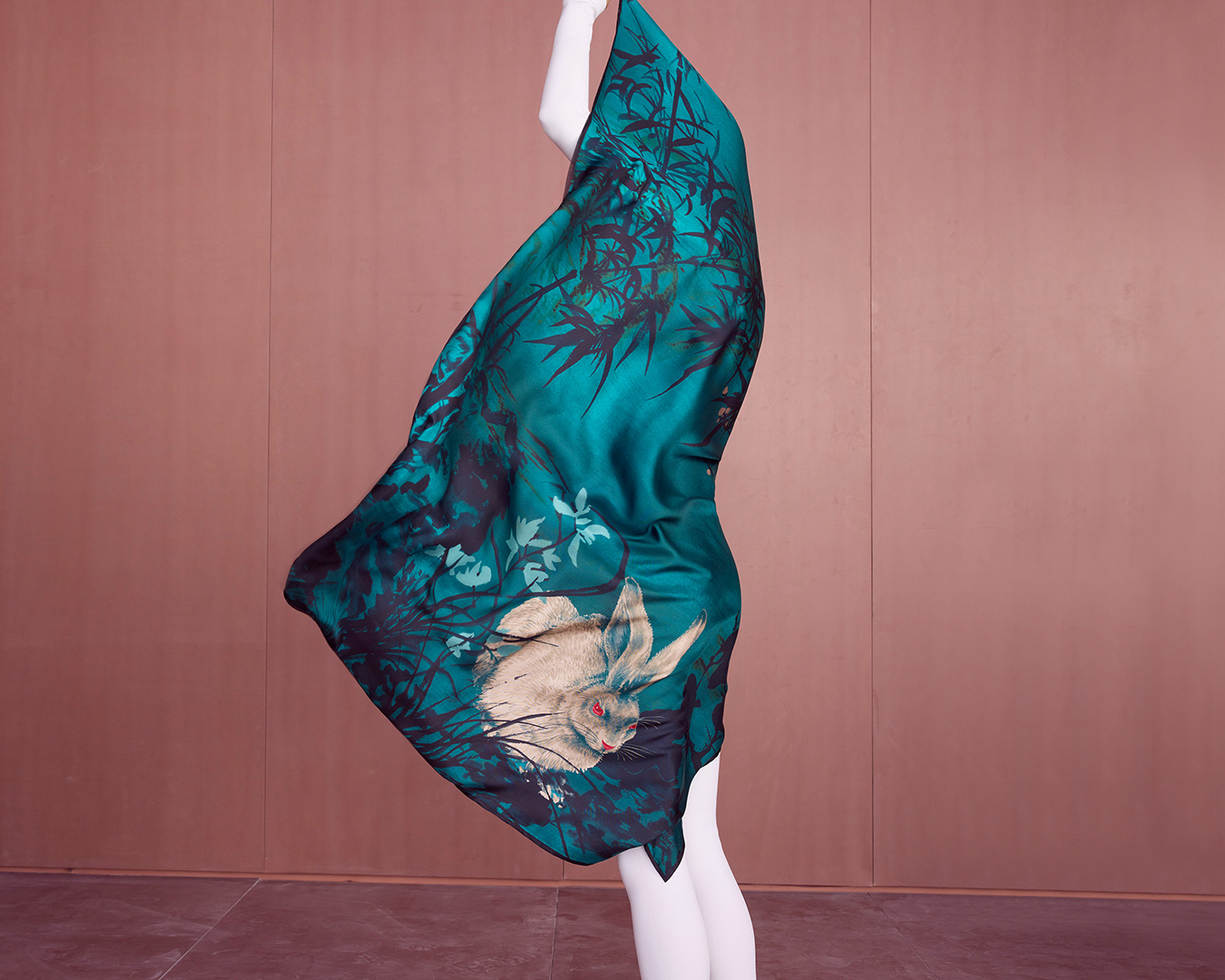
A symbol of mercy, elegance and beauty – also known as the luckiest animal in the Chinese zodiac – the white rabbit is the emblem of this Lunar New Year. Its eyes photographed in macro, deep and pure like gemstones along with its auspicious figure, animate a sophisticated range of silhouettes and accessories for men and women.


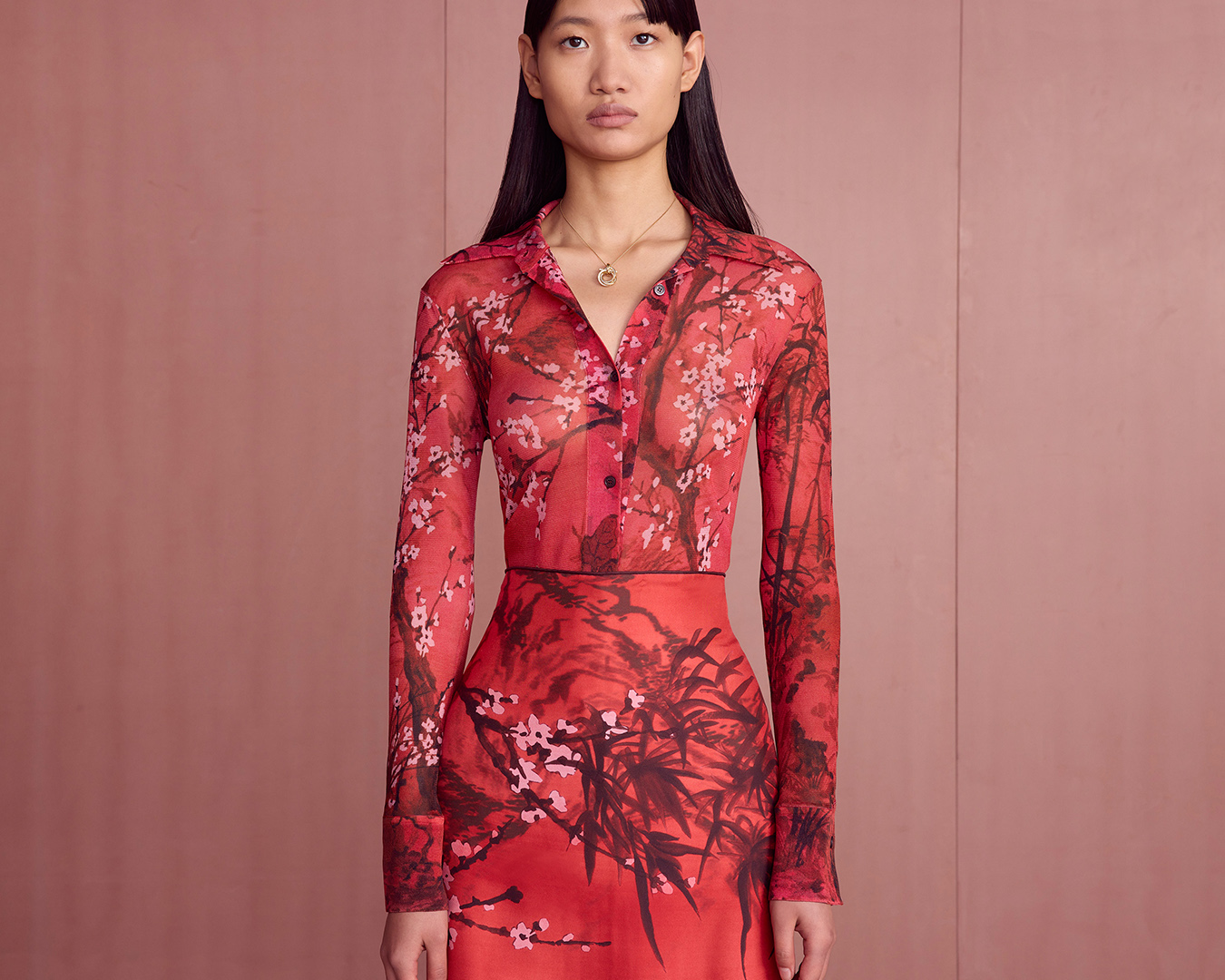
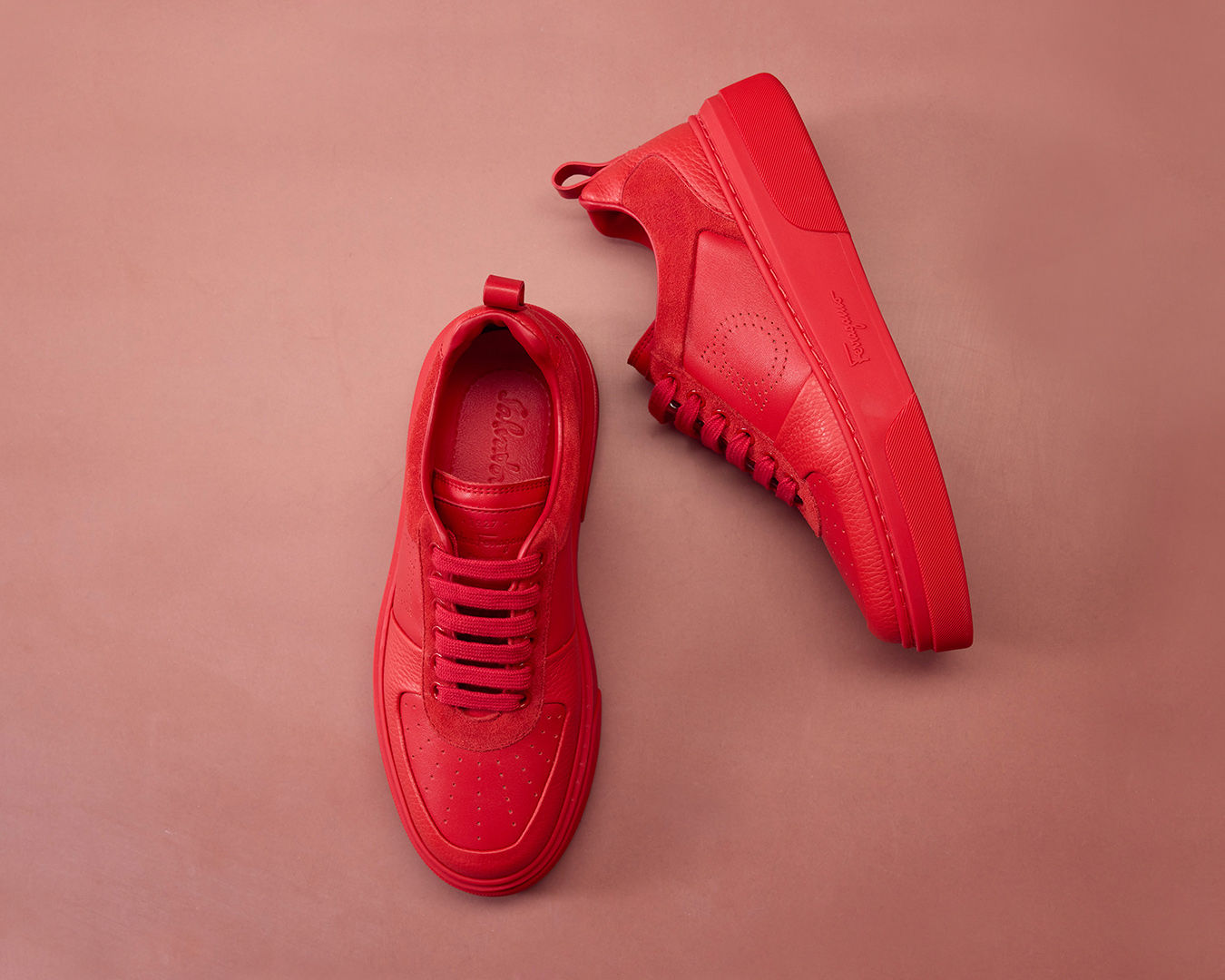
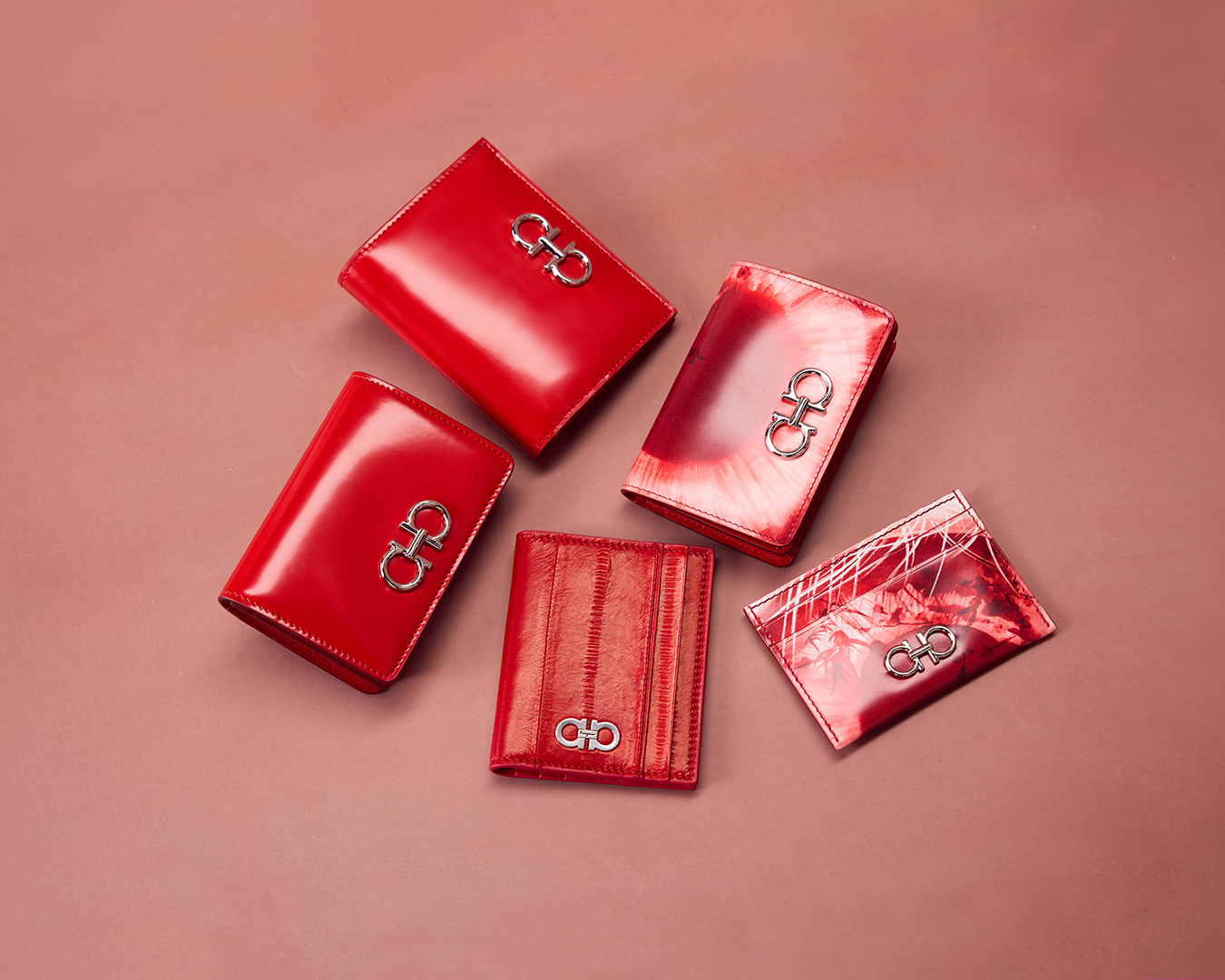
The capsule collection designed by Creative Director Maximilian Davis features silk foulards, shirts and skirts, a crewneck sweater, a city jacket and soft cotton t-shirts flanked by low-top sneakers, the Gancini buckle belt, small leather goods and signature carryalls including the Trifolio and Studio bags.


Along with the smooth leather accessories, a luxurious edit of eel-skin iterations with palladium-finished details complete the collection, intertwining the brand’s codes of contemporary elegance with the vision of a bright and joyful future.

The serene rabbit appears in an enchanting print with peach trees and bamboo leaves. His giant eyes are rendered in high impact graphics placed on bags and card holders. Rich shades of red, blue and white enliven the dreamy decorative landscapes contrasted by the monochrome pieces in Ferragamo red, such as the leather sneakers with perforated motifs and the fluid blouse over the pleated skirt.

The new Ferragamo LNY Capsule will be available from mid-January in Ferragamo boutiques and on ferragamo.com.

 

Khám phá và trải nghiệm tại hệ thống cửa hàng Ferragamo:

TP.HCM:
– Diamond Plaza: 34 Lê Duẩn, Q.1
ĐT: (028) 38 231 204 – 0911 771 310
– Rex Arcade: 4 – 6 Lê Lợi, Q.1
ĐT: (028) 38 232 004 – 0911 771 361

HÀ NỘI:
– Tràng Tiền Plaza: 24 Hai Bà Trưng, Q.Hoàn Kiếm
ĐT: (024) 39 367 129 – 0911 770 443